
The following options for token payments as ECOM transactions are possible:
- Payment by the button built into the online -store mobile app (InApp scheme).
- Payment in the browser (Web scheme), while receiving of encrypted package with payment data and a token is performed on the side of the Assist payment pages.
- Payment in the browser (Web scheme), while receiving of encrypted package with payment data and token is performed on the page of the online store.
If the customer chooses to pay using Mir Pay in a browser on a device that does not support such payment type, then IPS Assist (if configured appropriately) can display a special QR code on the payment page. The customer will be asked to use another suitable device to read this QR code and successfully complete the payment.
Payment by a token (Mir Pay) on the IPS Assist payment page
To organize the receipt of payments by the button on the IPS Assist payment page, you need to do the following preparatory steps:
- make a request to connect payment means for payments by token to the IPS Assist technical support service support@assist.ru;
- obtain confirmation from the IPS Assist technical support service that all the necessary technical settings for the functioning of the TokenPay payment processing service when paying for goods and services to your merchant have been fulfilled.
Payment by token in the browser on the page of the online store
When you pay by the Mir Pay token in the browser on the online store side, the following actions are performed:
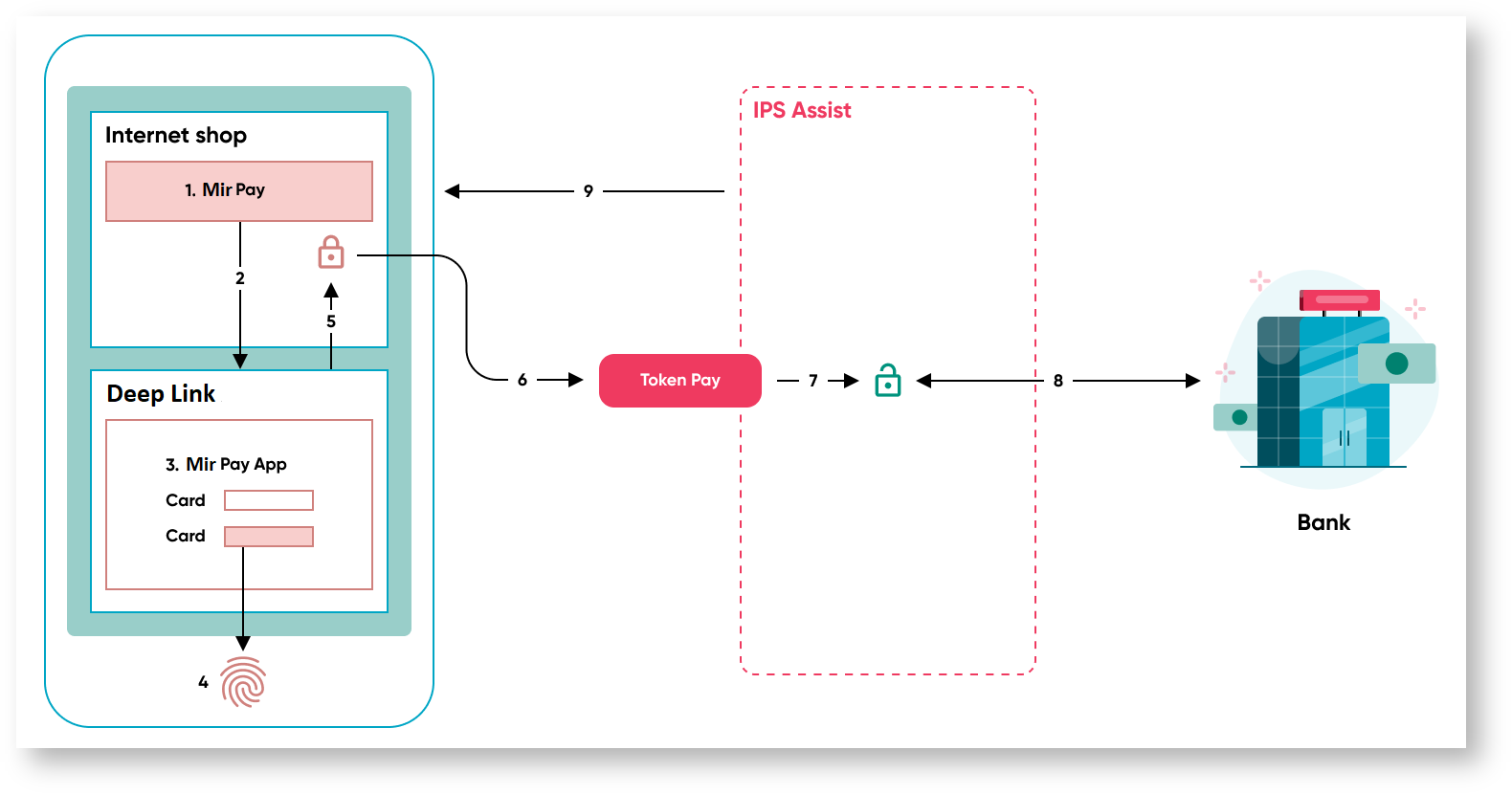
- The buyer selects the product or service on the online store site and presses the Mir Pay button.
- After pressing the Mir Pay button, Mir Pay app is called and data is transferred to the app using Deep Link / Universal Link, in which it will be possible to select one of the cards added in the Mir Pay mobile app.
- After selecting the card, the buyer has to confirm the payment.
- Mir Pay app creates an encrypted package with a token and payment data and returns it to online store page script.
- The encrypted packet with the token and payment data is sent to the IPS Assist TokenPay service.
- The IPS Assist decrypts the packet with the token and payment data.
- The IPS Assist performs payment by a token through the processing of a settlement bank.
- The IPS Assist returns the results of payment to the online store.
To organize the receipt of payments by token in the browser on the online store side, you need to do the following preparatory steps:
- make a request to connect payment means for payments by token (Mir Pay) to the IPS Assist technical support service support@assist.ru;
- embed into the code of your page;
- for payment - access to TokenPay service;
- Deep Link/Universal Link is used to initiate In-Application operation Mir Pay;
- implement receiving encrypted In-App payment data from Mir Pay on the server using the Payment data preparation Result Service API for In-Application transaction for Mir Pay;
- obtain confirmation from the IPS Assist technical support service that all the necessary technical settings for the functioning of the TokenPay payment processing service when paying for goods and services to your merchant have been fulfilled;
- prepare for payments receiving;
- when using Mir Pay, you should generate keys and a request for a certificate and obtain a Mir Pay certificate to make payments using the appropriate section of the Personal Account of IPS Assist.